Royal Kludge RK61 Review: The $90 Mechanical Keyboard That Punches Above Its Weight
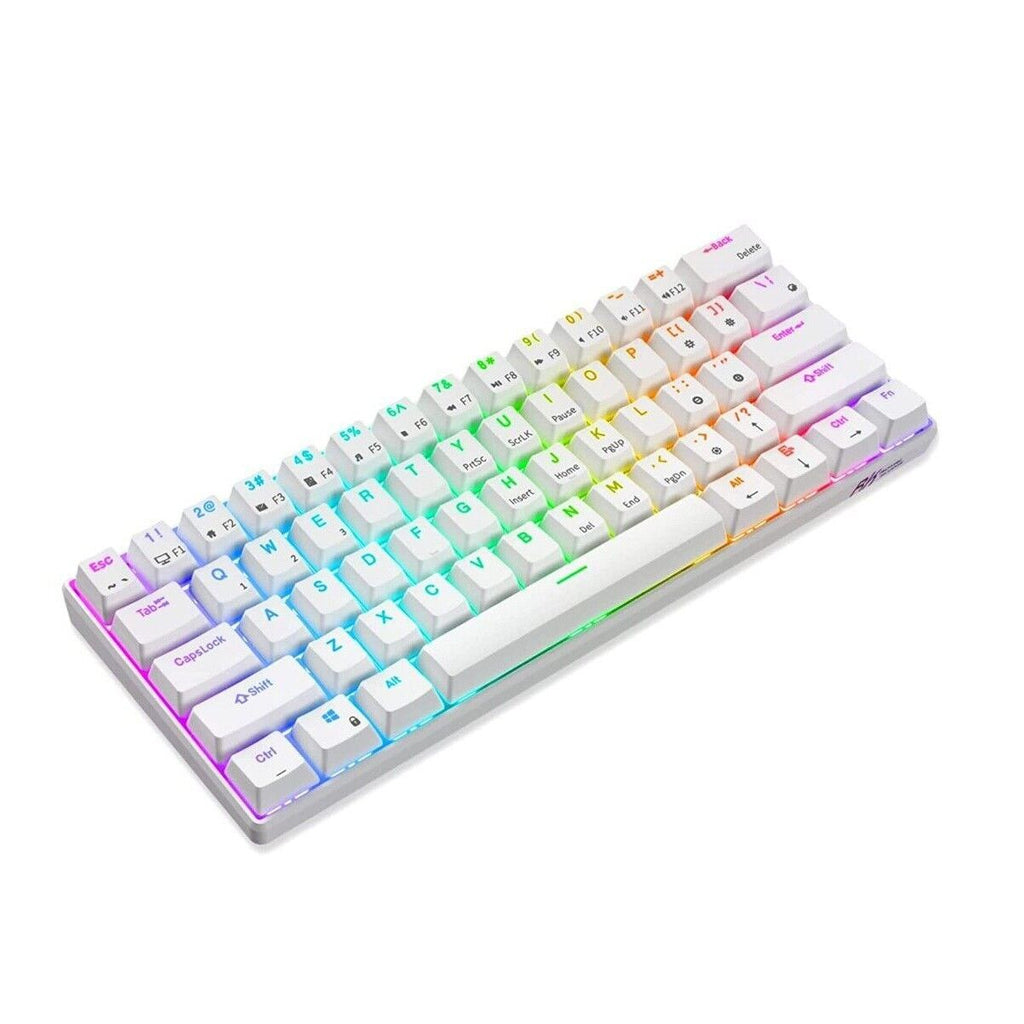
✅ Pros
- Tri-mode connectivity (Bluetooth, 2.4GHz wireless, USB-C wired)
- Hot-swappable switches for easy customisation
- Solid build quality with aluminium frame
- Vibrant RGB lighting with software control
- Available at JB Hi-Fi with easy returns
❌ Cons
- 60% layout isn't for everyone — no arrow keys or F-row
- Stock stabilisers are rattly and need lubing
- Software is Windows-only and clunky
Overview
The mechanical keyboard rabbit hole is deep, expensive, and addictive. The Royal Kludge RK61 is the affordable entry point that's hooked countless Aussie gamers and typists into the hobby. At $90 from JB Hi-Fi, this 60% tri-mode mechanical keyboard offers features that were exclusively premium territory just a few years ago: Bluetooth 5.1, 2.4GHz wireless, USB-C wired mode, hot-swappable switches, and per-key RGB.
Royal Kludge (yes, that's really the name) has built a reputation for punching well above their price point. The RK61 is their most popular model in Australia, and it's easy to see why.
Specifications
| Spec | Detail |
|---|---|
| Layout | 60% (61 keys) |
| Switch Options | Brown, Red, Blue (hot-swappable) |
| Connectivity | Bluetooth 5.1 / 2.4GHz / USB-C wired |
| Battery | 1,450mAh (up to 10 hours with RGB) |
| Keycaps | ABS double-shot |
| Frame | Plastic top, aluminium base plate |
| RGB | Per-key, software-controllable |
| N-Key Rollover | Yes (wired mode) |
| Weight | ~600g |
| Dimensions | 293 x 102 x 38mm |
Build Quality & Design
For $90, the RK61 feels surprisingly well-made. The aluminium base plate adds weight and rigidity — this doesn't flex when you press down or twist it. The keycaps are ABS double-shot, which means the legends won't fade, though they do develop shine over time. The font is clean and legible, avoiding the "gamer" aesthetic that plagues many budget keyboards.
The compact 60% layout means no dedicated arrow keys, function row, or numpad. You access these via Fn key combinations. If you've never used a 60% keyboard before, expect a week of adjustment — but most users find the extra desk space and ergonomic hand position worth the learning curve.
Available in white and black colourways, the RK61 looks good on any desk. The white version is particularly popular paired with a matching mouse for a clean, minimal aesthetic.
Switch Options
JB Hi-Fi stocks the RK61 with Brown and Red switch options. Here's the quick rundown:
- Brown switches: Tactile bump with moderate noise. The all-rounder choice for gaming and typing.
- Red switches: Linear and smooth. Preferred by gamers who want fast, quiet keypresses.
The real magic is that the RK61 is hot-swappable — you can pull out the stock switches with a keycap puller and drop in any 3-pin or 5-pin MX-compatible switch without soldering. This means you can start with Brown switches and later upgrade to Gateron Yellow, Akko CS, or any other enthusiast switch for $20-40.
The stock switches are decent but not exceptional. They're smooth enough for gaming and have consistent actuation. Keyboard enthusiasts will likely swap them eventually, but casual users will be perfectly happy with the stock experience.
Typing & Gaming Experience
Typing: The RK61 with Brown switches provides a satisfying typing experience with a noticeable tactile bump. Key travel is standard at about 4mm, and actuation is around 2mm. The typing sound is a pleasant "thock" — not too loud for office use, but with enough feedback to feel satisfying.
Gaming: In wired mode with full N-key rollover, the RK61 performs flawlessly for gaming. We tested in CS2, Fortnite, and Valorant with no missed inputs or ghosting issues. The 1ms response time in wired mode matches any "gaming" keyboard at twice the price.
Wireless gaming: The 2.4GHz mode adds about 2-3ms of latency, which is imperceptible for all but the most competitive FPS players. Bluetooth adds more latency (~10-15ms) and is best reserved for casual use or connecting to a tablet/phone.
The Stabiliser Issue
Every RK61 review has to mention this: the stock stabilisers are mediocre. The spacebar, backspace, and left shift will likely have a rattly, mushy sound compared to the regular keys. This is the most common complaint across all RK keyboards.
The fix is simple but requires some effort: remove the stabilisers, apply dielectric grease or Krytox 205g0 to the wire and housing, and reassemble. YouTube has dozens of tutorials. After lubing, the stabilisers go from "budget" to "good" — it's a 20-minute job that dramatically improves the experience.
If modding isn't your thing, the stabilisers are perfectly functional — they're just not as satisfying as the rest of the keyboard.
Battery Life & Connectivity
With RGB lighting at medium brightness, expect about 10 hours of battery life over Bluetooth. Turn RGB off and you'll get 40+ hours. The keyboard charges via USB-C (the same cable you use for wired mode), and charging from empty to full takes about 3 hours.
Switching between Bluetooth devices is done with Fn+1/2/3, supporting up to three paired devices. The 2.4GHz dongle (included) plugs into any USB-A port. Switching between wireless and wired is automatic when you plug in the cable — a nice touch.
Software
Royal Kludge's software is functional but won't win any design awards. It's Windows-only, and the interface is clearly translated from Chinese with some awkward labelling. That said, it lets you customise RGB effects, remap keys, and create macros. Most users will set their preferred lighting and never open it again.
Australian Pricing Context
- Royal Kludge RK61 (JB Hi-Fi): $90
- Redragon K530 Draconic (Amazon AU): ~$80
- Keychron K12 (via Keychron): ~$130 AUD shipped
- HyperX Alloy Origins 60 (Amazon AU): ~$130
At $90 from JB Hi-Fi, you get the convenience of in-store pickup, easy returns, and Australian consumer law protection. The Redragon is slightly cheaper but lacks hot-swap. The Keychron K12 is better built but costs significantly more. The RK61 hits the sweet spot of features versus price.
Who Should Buy This?
- Keyboard beginners who want to try mechanical without a big investment
- Gamers who want a compact, wireless-capable board
- Multi-device users who switch between PC, tablet, and phone
- Modding enthusiasts looking for a hot-swap platform to customise
Skip this if you need a full-size layout for data entry, or if the 60% layout sounds frustrating rather than liberating.
Verdict
The Royal Kludge RK61 has earned its reputation as the best entry-level mechanical keyboard in Australia. At $90 from JB Hi-Fi, the combination of tri-mode connectivity, hot-swappable switches, and solid build quality is simply unmatched. The stock stabilisers hold it back from a higher rating, but for the price, this keyboard overdelivers. It's the perfect starting point for anyone curious about mechanical keyboards.
🏆 The Verdict
The RK61 is the gateway drug to custom mechanical keyboards — tri-mode, hot-swap, and solid build quality for just $90 from JB Hi-Fi.
Buy Now — $90 AUD